I grew up with ADHD and loved computers. This was inconvenient because computers were very good at giving me seventeen fascinating directions and very bad at remembering which one had contained the task.
For years I treated that as a personal problem. I tried Pomodoro timers, RescueTime, to-do lists, elaborate notes systems, and the extremely popular method of keeping everything open while insisting I knew where it was.
Many of those tools are excellent. The Pomodoro technique makes time visible. To-do lists externalise commitments. Medication helps me. None of them changed the place where my work kept disappearing: the browser.
The Tab Was the Task
A tab is not merely a website. It can be the form you intend to submit, the message you still need to answer, the source that belongs in a draft, or the appointment you promised yourself you would book.
Close the tab and the intention disappears. Leave it open and the browser hides it inside a row of increasingly tiny favicons. The task survives in theory while working memory becomes responsible for the entire filing system.
ADHD commonly affects working memory, task initiation, inhibition, and returning after interruption. Ordinary browser navigation leans on all four. It asks you to remember what each page means, resist every tangent, reconstruct where you came from, and resume with one back button as your expedition guide.
This is not a character-building opportunity. It is a design brief.
Eleanor’s Work Drew the Same Shape
My partner Eleanor worked in photo research. One project could cross hundreds of pages from archives, museums, magazines, publishers, and client requests. Each useful image created several new searches.
Her browsing was not a line either. It was a tree, but the browser displayed the tree as a pile.
Two different brains and two different kinds of work had met the same interface failure. The computer already knew which link opened which page. It simply refused to show us, like a tiny bureaucrat sitting on perfectly organised records.
So I started building Horse.
Tabs Became Trails
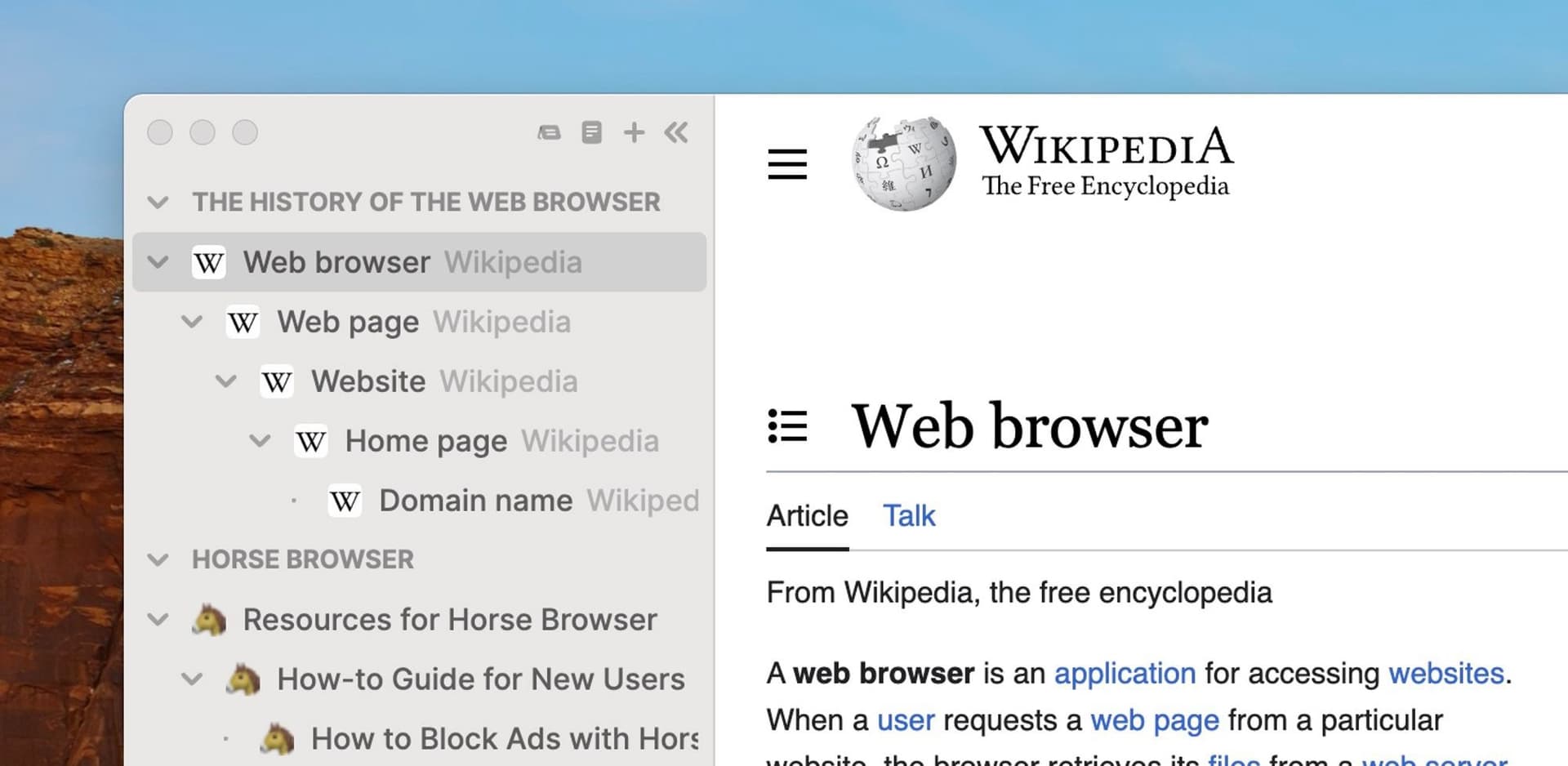
Horse Browser replaces tabs with Trails. Click a link and the new page branches beneath the page you came from. Follow another link and the branch grows. The structure appears automatically in the sidebar while you browse.
The task remains visible because its context remains visible. You can:
- Follow a tangent while keeping the route back
- Collapse one project and open another
- Return tomorrow with every page in the same relationship
- Add folders, names, emojis, and Notes when useful
- Drag a Trail into another app as a linked Markdown outline
- Open multiple windows onto the same shared map
Horse does not make you focus on the correct thing. It keeps the correct thing alive when attention moves. That is a more modest claim and a much more useful piece of technology.
Externalising Executive Function
A psychotherapist with ADHD later described the mechanism in one sentence: “Horse Browser externalises executive functioning.”
A calendar externalises time. A checklist externalises task tracking. A label externalises memory about what lives in the box. Trails externalise the structure and re-entry cues that tabbed browsing normally demands from the person.
Horse does not treat ADHD. It changes the environment, which is what accommodations are for. The browser takes responsibility for information it already has, and your brain gets to spend its effort on the actual task.
Computers love jobs! We had simply given this one the afternoon off for thirty years.
Why Build a Whole Browser?
Extensions can improve tabs enormously. Tree Style Tab is excellent at showing parent-child relationships. OneTab is excellent at gathering open tabs. Workona is excellent at deliberate workspaces, and blockers are excellent when access to a site is the problem.
Horse adds a different job at the navigation level. The tree is not an extension beside tabs, saved history, and bookmarks. It is the browser’s complete, persistent model of where you are.
That required building a browser, which was an unreasonable amount of work. Some unreasonable amounts are correct.
The Better Internet Is Buildable
ADHD does not need a browser-themed cure. It needs interfaces that stop charging extra cognitive rent for ordinary life.
The internet is magnificent. Curiosity is magnificent. Following connections is how people discover ideas, understand systems, and occasionally learn far too much about Japanese green tea. The answer is not a smaller internet or a more obedient brain. The answer is technology that preserves the shape of exploration and makes returning easy.
That is why Horse exists.
Try Horse Browser free for two weeks. Open something you care about, follow it a few links deep, then come back tomorrow. Your Trail will be waiting with the whole tiny family tree.