🐴 Horse 3.0: as many windows as you like, one shared sidebar.See what’s new →

Version v2.4.0

Released on January 1, 2025

**Groundwork: everything after this.** Horse was built deliberately light in its early years: one person, shipping fast, sometimes fixing a bug within five minutes of the report. That lightness was the plan, and it carried Horse a long way. This New Year’s update is where the insides grow up to match the ambitions: the largest update in Horse’s history, rebuilt to carry what’s on the roadmap, from multiple windows to extensions. And it still brings plenty on day one:

Originally shipped as v0.71.0 and retagged to v2.4.0 when Horse adopted its v1 to v3 numbering in 2026.

  • Select multiple Trails at once to create folders, export, or delete them together
  • Shortcut (Cmd/Ctrl+Shift+W) to delete a Trail and all its Subtrails at once
  • Drag the window from the top even when the toolbar is hidden
  • Mute any Trail’s audio by clicking its sound icon
  • Option to turn off the 3D Horse animation
  • Sidebar automatically scrolls to show the matching Trail when you click a link
  • Fine-grained controls for camera, microphone, and other permissions
  • 日本語対応
  • Animated collapsing/expanding Trails
  • Additional search engines: Perplexity, Startpage, Swisscows, MetaGer, Searx, Gigablast
  • Custom search engine URL
  • Saddlepack Password Manager can be disabled in Settings
  • Save and Go buttons work in new Trails
  • Dragging to select text in Trail input fields
  • Address bar shows the correct URL on error pages
  • Error pages explain what went wrong more clearly
  • Better handling of links when Horse isn’t running but set as default browser
  • Trails stay in the correct order after dragging
  • 3D Horse works on Windows and Linux with supported graphics
  • Right-click menu works in Focus Mode
  • Removed a false security warning from Windows Defender
  • No white flash in the sidebar when opening new Trails
  • Emoji support in imported Markdown files
  • Downloads and their folders open from the Downloads menu
  • Content no longer overflows the window with the native macOS title bar
  • Website backgrounds are no longer transparent while loading
  • Opening links in the background adds them to the bottom of the list
  • Sound icon appears and disappears more smoothly
  • Faster and smoother Trail dragging animations
  • 3D Horse starts facing west

Get on the Horse

The browser designed for ADHD minds. Trails® keep every page and every tangent where you left it.

favicon
Japanese Green TeasGoogle Search
favicon
Japanese Green TeaWikipedia
favicon
MatchaWikipedia
favicon
SenchaWikipedia
Sencha

From Wikipedia, the free encyclopedia

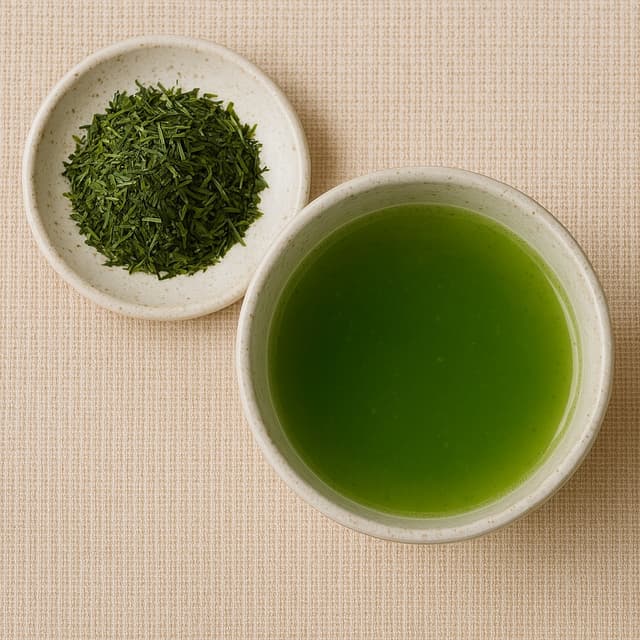
Sencha tea leaves and brewed tea

Sencha tea leaves and brewed tea

Sencha (煎茶) is a type of Japanese ryokucha (緑茶, green tea) which is prepared by infusing the processed whole tea leaves in hot water. This is as opposed to matcha (抹茶), powdered Japanese green tea, where the green tea powder is mixed with hot water and therefore the leaf itself is included in the beverage. Sencha is the most popular tea in Japan.
Types of sencha

The types of sencha are distinguished by when they are harvested. Shincha(新茶, "new tea") represents the first month's harvest of sencha. Basically, it's the same as ichibancha(一番茶, "first tea"), which is the first harvest of the year.

Kabusecha (かぶせ茶) is sencha grown in the shade for about a week before harvest. Asamushi (浅蒸し) is lightly steamed sencha, while fukamushi (深蒸し) is deeply steamed sencha.

Production

Sencha tea is made from the leaves of the Camellia sinensis plant. The leaves are steamed, rolled, and dried immediately after harvest to prevent oxidation. This process preserves the fresh, grassy flavor that sencha is known for.

The steaming process used in making sencha is what differentiates it from Chinese green teas, which are typically pan-fired. The duration of the steaming process affects the final taste and color of the tea.

Brewing

Sencha is typically brewed at lower temperatures than black tea or oolong tea. The ideal water temperature is usually between 60–80°C (140–176°F), with brewing time ranging from 1 to 2 minutes.

The tea can be brewed multiple times, with each infusion revealing different flavor notes. The first brew tends to be more astringent and fresh, while subsequent brews become milder and sweeter.

Join Our Community

Stay connected with updates, participate in discussions, and help shape the future of Horse Browser through our community channels.

Unsubscribe anytime.
Horse NewsletterIssue #12

Turn your Browser into the Ultimate Productivity System.

You don’t need a todo list, or a notes app. Your browser can do these things. But it should be more integrated than simply loading a website. This is where Horse Browser comes in, with built-in productivity features that make your browser a powerful tool.

Read the Manual

The full user manual: getting started, basics, navigation, features, and the FAQ.

Open the Manual
Opening page of the Horse Browser manual

Need Help?

Access your account, manage billing, and find answers to frequently asked questions about Horse Browser.

Get Help
Pascal and Eleanor at Disneysea Tokyo