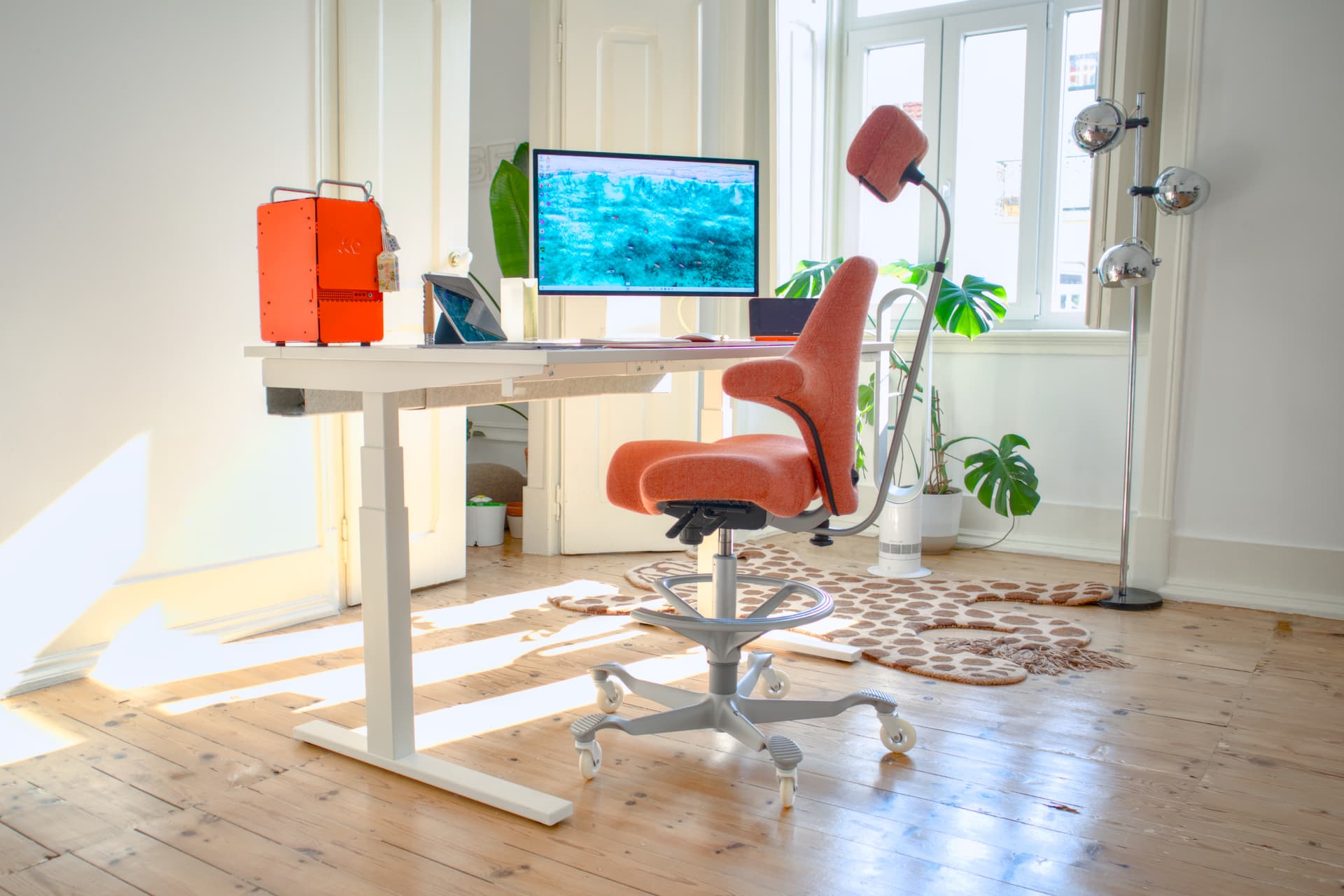
If you have ADHD and you are looking for an ADHD chair, ADHD office chair, ADHD desk chair, or any other chair-shaped object that does not feel like a torture device after twenty minutes, you have probably already bought one or two that did not work. You are not picky. You are not weak. You are restless, your skin starts crawling within ten minutes of sitting still, and the entire ergonomic-office-chair industry was designed for a different nervous system.
Here is the answer, before the article: it is not one chair, it is two¹. The HÅG Capisco for active sitting and a comfortable lounge chair for crash mode. Plus a standing desk so you can switch between them without rearranging the room. This is the honest ADHD chair setup for adults. The article is the buying guide.
The TL;DR
| Item | Pick | Approx price | Why |
|---|---|---|---|
| Active-sitting chair | HÅG Capisco (or Capisco Puls if budget is tight) | $1,500–$2,000 | Encourages constant movement instead of fighting it |
| Standing-desk option | IKEA Bekant electric or any motorised desk | $300–$600 | Lets you alternate Capisco / lounge / standing without changing rooms |
| Lounge / crash chair | Any comfortable lounge chair that fits under your standing desk at lowered height (IKEA Poäng works) | $200–$400 | The "I need to lie back and keep working" posture you have been using your sofa for |
Total setup: $2,000–$3,000. Yes, it is real money. It is also less than the cumulative cost of the four ergonomic chairs you bought before this one and gave away to housemates.
Why Every "Ergonomic" Chair Fails ADHD Adults
Walk into any office store. Every chair on the floor is designed for stillness. Lumbar support locks your spine. Armrests pin your elbows. The seat pan is designed for one specific posture maintained for eight hours.
For an ADHD adult, eight hours in one posture is torture. The brain seeks stimulation; the body translates that to movement; the chair fights the movement; the chair wins for thirty minutes; the body wins for the rest of the day; you end up working from the sofa with your laptop balanced on a knee².
The standard answer, "you just need to find the right ergonomic chair", is wrong. There is no ergonomic chair that fixes the wanting-to-move-constantly part, because the entire category is engineered against that. The category is not the answer. The category is the problem.
The Active-Sitting Chair: HÅG Capisco
The HÅG Capisco is a Norwegian active-sitting saddle chair from the 1980s. It looks like a cartoon. Star Trek props it on the bridge of the Enterprise. The reviews on YouTube are an unusually clean split, about ten people who hate it for every one person who loves it.
Here is the trick: that ratio is roughly 1-in-10, and ADHD prevalence in adults is 1-in-12. The Capisco is not a chair most people like. It is a chair the small fraction of the population whose nervous systems do not tolerate normal chairs adore. Pascal, restless ADHD adult, the author of this article, has been sitting on one for years and refuses to give it up.
What it does:
- The seat pan is shaped like a saddle so you cannot lock your hips
- You can sit forward, sideways, backward, cross-legged, half-standing, none of these are wrong
- Constant micro-movement is the design intent, not a bug
- The high-stool version (Capisco High) lets you sit at a raised standing desk without changing height
What it does not do:
- It is not comfortable in the traditional sense. Standing is more comfortable than the Capisco. That is also why it works: you actually use the standing desk, because the chair is not seducing you into staying seated for four hours
- No lumbar support. You provide your own posture by moving
- Some people get a sore tailbone for the first two weeks. After that, no
Where to buy: HÅG Capisco direct (US/EU shipping), or look on facilities-resale sites for office liquidations, used Capiscos appear at 40-60% of new price and last forever.
Cheaper alternative: The HÅG Capisco Puls is the polypropylene-shell version at roughly two-thirds the price. Same shape, less luxury. Works.
Even cheaper alternative: A generic saddle stool ($150-300) gets you the saddle-seat principle without the back support. Less versatile, but it is the closest analog if Capisco is out of reach.
The Lounge Chair: For When the Capisco Is Too Much
Active sitting is not always what your nervous system wants. Sometimes you need to lean back, slouch, half-recline with the laptop on your stomach, and keep working. ADHD adults do this naturally; the wellness internet calls it bad posture; both are right.
The trick is to put a lounge chair at your desk, with the standing desk lowered to lounge height, so you can lean back and still see the monitor. This is the move that turns "working from the sofa with the laptop on a knee" into a real workstation.
What works:
- IKEA Poäng ($200): the canonical option, fits under most lowered standing desks, infinite replacements, infinite slipcovers
- Any low lounge chair with a slight recline, second-hand store finds work fine
- The "I would put a beanbag at my desk" instinct, keep that instinct, just route it through a chair frame so the laptop has somewhere to land
What does not work:
- A reclining gaming chair at a normal desk height, you end up looking up at the monitor, neck pain follows
- Anything with armrests too tall to slide under a desk
- A regular sofa across the room, the friction of moving over there is too high; you will stop using it
The Standing Desk: The Quiet Hero
The standing desk is what makes the two-chair setup work. You alternate between Capisco at full height, lounge chair at lowered height, and standing, depending on which posture your nervous system needs at any given moment.
Recommendation: Any motorised standing desk with memory presets. The IKEA Bekant does the job at $400-600. Fully Jarvis is the upgrade at $700-1,200. Skip manual-crank desks, you will not actually use them.
Set three height presets:
- Standing (your normal standing height)
- Capisco High (saddle stool seated height)
- Lounge (low enough that the lounge chair slides under)
One button per posture. No friction. The setup falls apart if changing modes takes more than two seconds³.
The Cross-Legged Chair Trend (Pipersong, And Why The Lounge Chair Wins)
If you have spent any time on ADHD TikTok or Reddit in the last year, you have seen people promoting the Pipersong meditation chair as the ADHD answer to "I want to sit cross-legged at my desk." The cross-legged urge is real, sitting cross-legged is one of the few stationary postures that does not make an ADHD body want to flee. The Pipersong is the dropshipping-shaped answer the algorithm decided to give us. It is not the actual answer.
What the Pipersong is: a normal-looking desk chair with a third platform bolted onto the front so you can fold a leg up onto it. That is the entire feature. It is awkward, it is expensive for what it is, the lower platform makes it visually weird in a workspace, and it locks you into one specific posture, the cross-legged one, which is the opposite of what the ADHD body actually wants (which is to change postures often).
What works better: a comfortable lounge chair at a lowered standing desk. You can sit cross-legged. You can sit one-leg-crossed. You can lean back. You can lean way back. You can flip sideways. You can do the laptop-on-the-stomach thing. All the postures, including the cross-legged one, on the same chair, no extra platform required. And when you want to stop and stretch, you raise the desk, get up, and the chair stays a chair.
The reason the Pipersong gets recommended is that it is a single visible product the algorithm can show. "Get a lounge chair and a standing desk" is harder to package as a TikTok. It is also cheaper, more flexible, and more honest. So: skip the Pipersong. Get the lounge chair. Cross your legs on it. We are saving you ~$400 and a regret.
A keyword note for fellow neurodivergents searching: terms like "cross legged chair", "cross legged office chair", "chair for sitting cross legged", and "ADHD cross legged chair" all point at the same underlying need, I want to fold up at my desk, and the answer is the lounge-chair-plus-low-desk setup, not a single specialty product.
What Else to Skip
The wellness internet has opinions about what ADHD adults should sit on. Most are wrong.
- Exercise balls. Looks like the right idea, a chair that wobbles. In practice: deflates over time, no back support for the lounge mode, rolls when you stand up, mildly humiliating in video calls. Pass.
- Kneeling chairs. Locks one specific posture (the kneel), which is the opposite of what the ADHD body wants. Some people love them. Most ADHD adults find they fight the chair within a week.
- $3,000 Herman Miller Aeron. Beautiful chair. Designed for stillness. Will become the most expensive and ergonomic clothes-rack you have ever owned.
- Gaming chairs with bucket seats. They look like racecars. They feel like racecars: locked in one posture, designed to keep you in it. Not the move.
Frequently Asked Questions
What is the best chair for adults with ADHD?
The HÅG Capisco for active sitting, paired with a comfortable lounge chair for relaxation mode, on a motorised standing desk that lets you switch between the two. One chair will not work; two chairs plus standing will. This goes for "best ADHD chair," "best ADHD office chair," "best ADHD desk chair", same answer, the marketing labels do not change the underlying need.
What is the best ADHD office chair?
A HÅG Capisco. There is no specific "office chair" answer different from the general ADHD chair answer, the office context just means you need it to fit a desk, which the Capisco High does. Pair it with a motorised standing desk so you can switch postures without leaving the office.
What is the best ADHD desk chair?
Same answer: HÅG Capisco at a motorised standing desk. The "desk chair" framing is what most retailers use; it does not change the underlying recommendation.
Is the Pipersong meditation chair good for ADHD?
Not really. It does one thing, lets you sit cross-legged at a desk, and it does that thing awkwardly via a bolted-on platform. A regular lounge chair under a lowered standing desk lets you sit cross-legged, one-leg-crossed, leaning back, slouched, and every other ADHD-friendly posture, on the same chair, for less money. The Pipersong is the answer the algorithm gives because it is a single product. It is not the best answer.
What is the best chair for sitting cross-legged at a desk?
A comfortable lounge chair (IKEA Poäng works) under a motorised standing desk lowered to lounge height. You can fold your legs up however you want, the chair does not fight you, and the same chair handles every other reclined posture. Cheaper, more flexible, and less awkward than a dedicated "cross-legged chair" product.
Is a kneeling chair good for ADHD?
Mixed. Kneeling chairs encourage one specific posture, which contradicts the ADHD body’s preference for constant movement. Some people with ADHD do well on them; most prefer saddle chairs or active-sitting chairs that allow more variety.
Why do ADHD adults hate ergonomic chairs?
Standard ergonomic chairs are designed to lock the body in one supported posture for eight hours. ADHD nervous systems want constant micro-movement and posture variety. The features that make ergonomic chairs "good" (lumbar support, armrests, fixed seat shape) are exactly what makes them feel like a cage to an ADHD adult.
Is the HÅG Capisco worth $2,000?
If you have ADHD and you have already bought 2-3 ergonomic chairs that did not work, the Capisco is cheaper than a fourth wrong chair. If you have never tried active sitting and you are not sure you have ADHD, start with a $200 saddle stool first to confirm the principle, then upgrade.
Do I really need a standing desk too?
Yes. The two-chair setup only works if you can alternate without changing rooms or rearranging furniture. A motorised standing desk with memory presets is what makes "switch postures every 90 minutes" frictionless instead of aspirational.
A Soft Cross-Sell
You are reading an honest buying guide for chairs because you are an adult with ADHD trying to set up a workstation that does not torture you. We salute that. We also make a browser for ADHD adults that does the equivalent thing for tabs, replaces the rigid, single-posture default with a shape that accommodates how your brain actually works. If after the chair situation you still feel like the rest of your computer is fighting you, we built that too. If you want the side-by-side, here’s how Horse compares to the other browsers people try for ADHD.
Either way, get the Capisco. We promise.
Notes & references
- This is the part most ADHD-chair buying guides get wrong. They write "the 10 best ADHD chairs of 2026" and pretend any one of them solves the problem. They do not. The unit is not one chair. The unit is one workstation that lets you change posture without changing rooms.⤴
- The laptop-on-the-sofa-on-the-knee position is the body’s correct response to a wrong chair. The mistake is treating the chair as the working solution and the sofa as the failure mode. They are both data: the body wants variety; give it variety on purpose.⤴
- Friction kills the system. If switching postures takes effort, you will pick one and stick with it, and that one will become uncomfortable, and you will be back in sofa-laptop-knee mode by 4pm.⤴




