How to exclude web apps or certain sites from Trails navigation

August 28th, 2023

Some sites (Twitter, Instagram, web apps) work better when links open in the current page instead of branching. Here’s how to set that.

152 words by Eleanor McKeown

By default, every link in Horse Browser branches off into a new page on the Trail. That’s great for research and most regular browsing. It’s slightly worse for sites that are basically applications (Twitter, Instagram, Gmail) where the "links" are really internal navigation and you don’t want a new page each time.

Two ways to handle it: open one link in the current Trail, or always exclude a site.

Open one link in the current Trail

For one-off use, toggle the link behaviour for the current Trail.

Mouse users: Menu > Navigation > Open Links in Current Trail

Keyboard users: +Y

Navigation Menu in Horse Browser with Link Behaviour Action

Always exclude a site or web app

In Settings, add the domain to the Link Behaviour Exclusions list. The list ships with a few popular ones already filled in; remove or add as you like.

Mouse users: Horse > Settings

Keyboard users: +,

Add the domain (e.g. linkedin.com or *.linkedin.com).
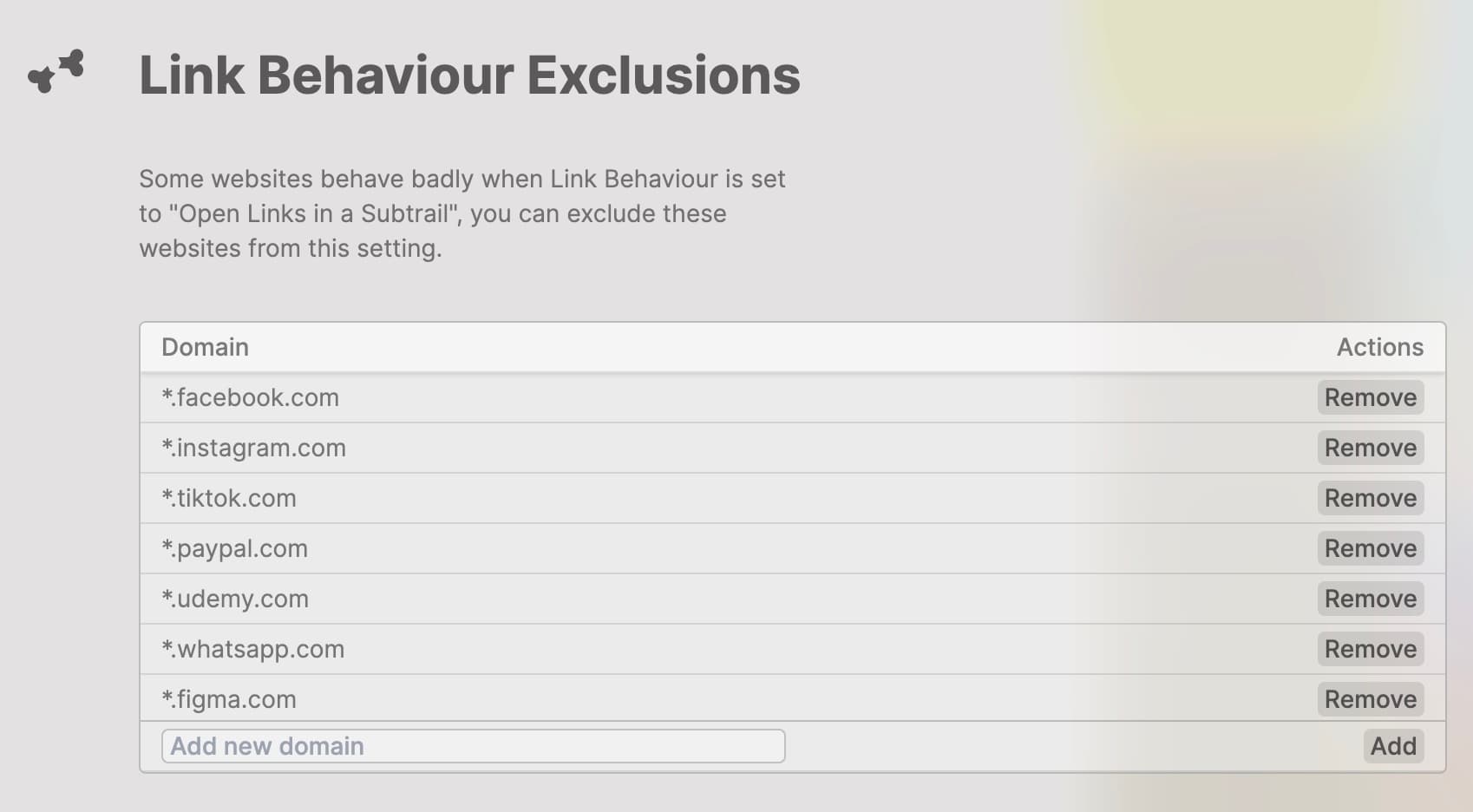
Link Behaviour Exclusions in Horse Browser

Get on the Horse

The browser built for ADHD minds. Trails® keep the task alive when a tangent or interruption carries you elsewhere.

favicon
Japanese Green TeasGoogle Search
favicon
Japanese Green TeaWikipedia
favicon
MatchaWikipedia
favicon
SenchaWikipedia
Sencha

From Wikipedia, the free encyclopedia

Sencha tea leaves and brewed tea

Sencha tea leaves and brewed tea

Sencha (煎茶) is a type of Japanese ryokucha (緑茶, green tea) which is prepared by infusing the processed whole tea leaves in hot water. This is as opposed to matcha (抹茶), powdered Japanese green tea, where the green tea powder is mixed with hot water and therefore the leaf itself is included in the beverage. Sencha is the most popular tea in Japan.
Types of sencha

The types of sencha are distinguished by when they are harvested. Shincha(新茶, "new tea") represents the first month's harvest of sencha. Basically, it's the same as ichibancha(一番茶, "first tea"), which is the first harvest of the year.

Kabusecha (かぶせ茶) is sencha grown in the shade for about a week before harvest. Asamushi (浅蒸し) is lightly steamed sencha, while fukamushi (深蒸し) is deeply steamed sencha.

Production

Sencha tea is made from the leaves of the Camellia sinensis plant. The leaves are steamed, rolled, and dried immediately after harvest to prevent oxidation. This process preserves the fresh, grassy flavor that sencha is known for.

The steaming process used in making sencha is what differentiates it from Chinese green teas, which are typically pan-fired. The duration of the steaming process affects the final taste and color of the tea.

Brewing

Sencha is typically brewed at lower temperatures than black tea or oolong tea. The ideal water temperature is usually between 60–80°C (140–176°F), with brewing time ranging from 1 to 2 minutes.

The tea can be brewed multiple times, with each infusion revealing different flavor notes. The first brew tends to be more astringent and fresh, while subsequent brews become milder and sweeter.

Get the Good Horse Email

One useful feature, one good story, or one meaningful update. We only send when we have something worth opening.

Unsubscribe anytime.
Horse NewsletterIssue #12

Your browser can remember the internet for you.

Drag a Trail into your notes and the whole branching path lands as Markdown. Yes, the entire tiny family tree. Computers love carrying things!

Read the Manual

Every button, shortcut, Trail, folder, note, and slightly secret Horse trick, explained plainly.

Open the Manual
Opening page of the Horse Browser manual

Need Help?

Find the answer, manage your license or billing, and get Horse back onto the Trail.

Get Help
Pascal and Eleanor at Disneysea Tokyo